ThockBoard
Mechanical keyboard sounds for every keystroke. AI Mode reads your mood. 16 sound packs, zero setup.
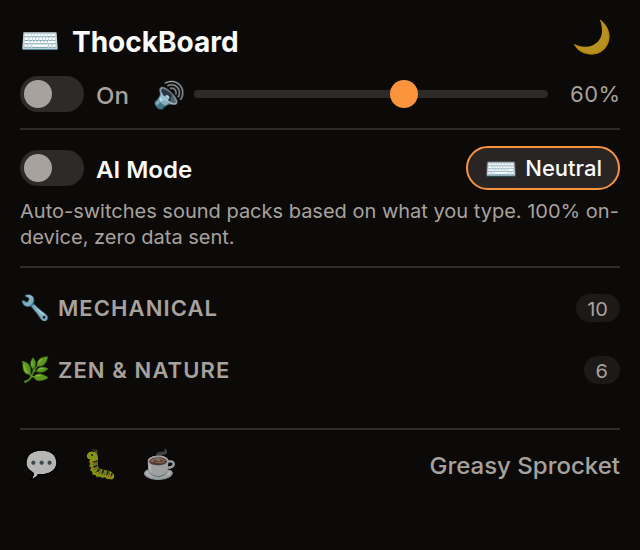
16 sound packs (Cherry MX, buckling spring, zen, water drops, and more)
AI Mode: auto-switches packs based on your typing mood — 100% on-device
Adjustable volume per pack
Dark/light theme with palette switcher
Works on any website — no configuration needed
100% free, no premium tiers, zero data sent
ThockBoard adds satisfying mechanical keyboard sounds to every keystroke, on any website.
Choose from 16 carefully crafted sound packs — from the classic Cherry MX Blue click to soothing zen water drops and bamboo chimes. Each pack is synthesized with DSP for realistic, non-repetitive audio.
Sound packs
| Category | Packs |
|---|---|
| Mechanical | Cherry MX Blue, Cherry MX Red, Buckling Spring, Topre |
| Thocky | Thocky Default, Deep Thock, Hall Effect |
| Zen | Water Drop, Bamboo, Singing Bowl, Crystal |
| Fun | Bubble, Soft Tap, Pop, Mechanical Click, Rain |
How it works
ThockBoard listens to keyboard events on whatever page you’re typing on — Google Docs, GitHub, Twitter, a plain textarea — and plays a short audio clip for each keystroke. The clips are pre-loaded from bundled audio files, so there’s no network request on every key press. The Web Audio API handles playback with near-zero latency.
You pick a sound pack and set the volume from the popup. That’s it. No settings page, no account, no configuration file.
AI Mode
ThockBoard AI reads the mood of what you’re typing — right in your browser, with no data ever leaving your device. A tiny sentiment model (752KB) runs via WebGPU (with WASM fallback), classifying your text as you type and mapping it to 5 mood zones:
| Mood | Sound Packs |
|---|---|
| 🌧️ Intense | Buckling Spring, Rain, Zilent |
| ⚡ Focused | Thocky, Typewriter, Zilent |
| ⌨️ Neutral | Cherry MX Blue, Cream, Amber |
| ✨ Happy | Topre, Holy Panda, Bamboo |
| 🎶 Joyful | Water Drop, Crystal, Wind Chime |
Hysteresis prevents rapid pack switching when your sentiment hovers near a boundary. Toggle AI Mode off anytime to pick packs manually — the choice is yours.
100% on-device. No analytics, no tracking, no telemetry. The model, vocab, and WASM runtime are all bundled with the extension. Nothing is downloaded from external servers.
Privacy
ThockBoard doesn’t collect any data. No analytics, no tracking, no telemetry. Sound files are bundled with the extension — nothing is downloaded from external servers. The extension doesn’t request any permissions beyond what’s needed to listen to keyboard events and play audio.
Free forever
ThockBoard is 100% free. All 16 sound packs are available to everyone. There are no premium tiers, no locked features, no usage limits. If you enjoy it, you can buy me a coffee — but there’s zero pressure.
How would you rate ThockBoard?
Click a star to vote — no account needed.
Frequently asked questions
Is ThockBoard really free?
Yes, 100% free. All 16 sound packs are available to everyone. No premium tiers, no locked features, no usage limits. If you enjoy it, you can buy me a coffee — but there's zero pressure.
Does ThockBoard collect any data?
No. ThockBoard doesn't collect any data. No analytics, no tracking, no telemetry. Sound files are bundled with the extension — nothing is downloaded from external servers.
Will ThockBoard slow down my browser?
No. ThockBoard uses the Web Audio API to play short sound clips on keystroke. The audio engine is lightweight and only active when typing. CPU usage is negligible.
Can I use ThockBoard on any website?
Yes. ThockBoard works on any website without configuration. Just install it, pick a sound pack, and start typing.
How do I change the sound pack or volume?
Click the ThockBoard icon in your Chrome toolbar to open the popup. From there you can select any of the 16 sound packs and adjust the volume slider.
Does it work with other browsers like Firefox or Edge?
ThockBoard is built for Chrome and Chromium-based browsers (Edge, Brave, Arc). A Firefox version is not planned but the extension uses standard WebExtensions APIs, so it could work with minor adjustments.