Text Tools
Convert text instantly — UPPERCASE, lowercase, camelCase, kebab-case, and 9 more. Popup or right-click. Free.
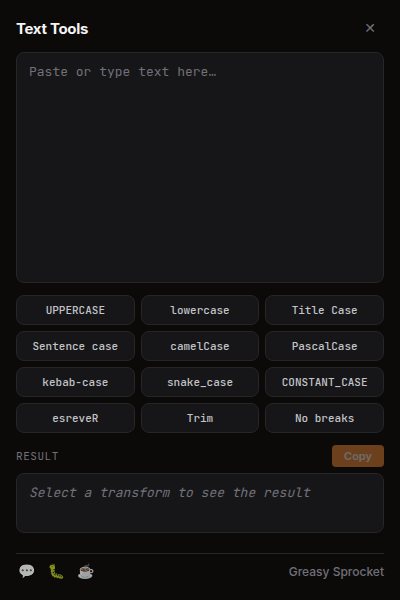
12 transforms: UPPERCASE, lowercase, Title Case, Sentence case
Code cases: camelCase, PascalCase, kebab-case, snake_case, CONSTANT_CASE
Utilities: Reverse, Trim, Remove line breaks
Popup: paste, transform, copy — one click
Context menu: select text → right-click → Text Tools → auto-copies
100% free, no premium, no ads, no tracking
Text Tools works two ways:
- Popup — click the toolbar icon, paste text, pick a transform, copy.
- Context menu — select text on any page, right-click → Text Tools → transform → copies to clipboard automatically.
All transforms
| Category | Transforms |
|---|---|
| Case | UPPERCASE, lowercase, Title Case, Sentence case |
| Code | camelCase, PascalCase, kebab-case, snake_case, CONSTANT_CASE |
| Utility | Reverse, Trim, Remove line breaks |
How it works
Text Tools runs entirely in your browser. When you select text and right-click, the extension reads your selection, applies the transform, and writes the result to your clipboard — all locally, no server round-trip. The popup works the same way: paste, pick a transform, and the result is ready to copy.
The extension uses standard Clipboard API and context menu APIs. No background scripts that phone home, no analytics, no telemetry.
Privacy
Text Tools doesn’t collect any data. No analytics, no tracking, no telemetry. Everything runs locally in your browser. Nothing is sent to any server.
Free forever
Text Tools is 100% free. All 12 transforms are available to everyone. There are no premium tiers, no locked features, no usage limits. If you enjoy it, you can buy me a coffee — but there’s zero pressure.
How would you rate Text Tools?
Click a star to vote — no account needed.
Frequently asked questions
Is Text Tools really free?
Yes, 100% free. All 12 transforms are available to everyone. No premium tiers, no locked features, no usage limits. If you enjoy it, you can buy me a coffee — but there's zero pressure.
Does Text Tools collect any data?
No. Text Tools doesn't collect any data. No analytics, no tracking, no telemetry. Everything runs locally in your browser. Nothing is sent to any server.
How do I use Text Tools?
Two ways: (1) Click the toolbar icon to open the popup, paste text, pick a transform, and copy. (2) Select text on any page, right-click, go to Text Tools, and pick a transform — the result is automatically copied to your clipboard.
What text transforms are available?
12 transforms across three categories: Case (UPPERCASE, lowercase, Title Case, Sentence case), Code (camelCase, PascalCase, kebab-case, snake_case, CONSTANT_CASE), and Utility (Reverse, Trim, Remove line breaks).
Does Text Tools work offline?
Yes. Text Tools works entirely offline. All processing happens locally in your browser. No internet connection is needed after installation.
Can I use Text Tools on any website?
Yes. The context menu works on any website where you can select text. The popup works anywhere — just click the toolbar icon, paste, and transform.