TabFM
Lo-fi radio in every new tab. 15 ambient soundscapes, Smart Mode, clock, and search — 100% offline.
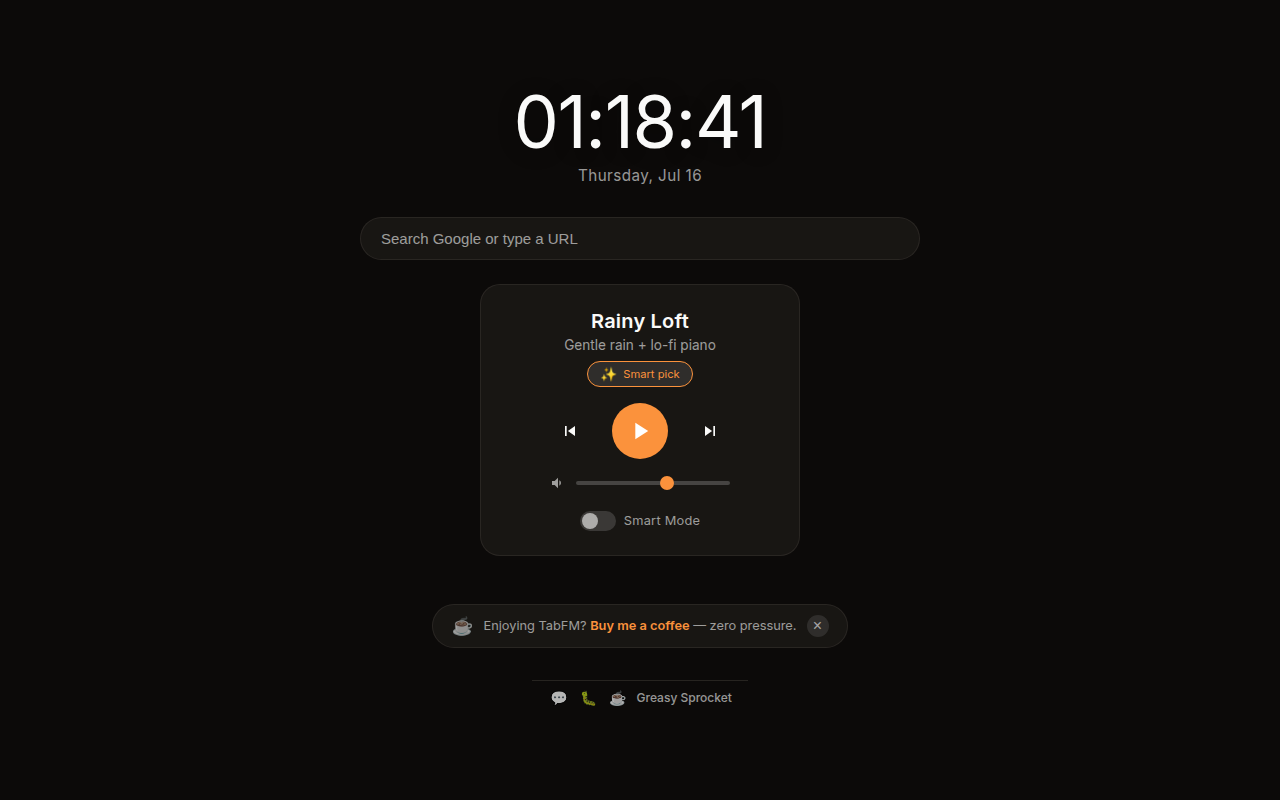
15 ambient soundscapes (rain, forest, ocean, deep space, vinyl, and more)
Smart Mode — auto-selects soundscape by time of day, typing speed, and learned preferences
Clock + Google search built into the new tab page
Animated gradient backgrounds that match each soundscape
Play, pause, skip, and volume controls
100% offline — no streaming, no external services, no ML models
100% free, no premium tiers, no ads, no tracking
TabFM replaces your new tab page with a calm, focused space: a clock, a Google search bar, 15 ambient soundscapes, and an optional Smart Mode that picks the perfect vibe for the moment.
Soundscapes
| Vibe | Soundscapes |
|---|---|
| Cozy | Rainy Loft, Coffee Shop, Vinyl Crackle, Vinyl Jazz |
| Nature | Forest Dawn, Ocean Waves, Mountain Stream, City Rain |
| Focus | Night Drive, Deep Space, Crackling Fire, Pixel Rain |
| Calm | Winter Wind, Summer Night, Tibetan Bowl |
Each soundscape is a 3–5 minute loop, synthesized with DSP (numpy/scipy) and bundled as a compact MP3. No streaming, no external services — everything lives inside the extension.
Smart Mode
Smart Mode is an opt-in feature that auto-selects a soundscape when you open a new tab. It combines three signals:
-
Time of day — 6 time blocks, each with a curated soundscape pool:
- 🌅 Early morning (5–9) → Forest Dawn, Mountain Stream, Tibetan Bowl
- ☕ Morning (9–12) → Coffee Shop, Vinyl Jazz, Rainy Loft
- 🔆 Midday (12–15) → Coffee Shop, City Rain, Ocean Waves
- 🌿 Afternoon (15–18) → Ocean Waves, Forest Dawn, Mountain Stream
- 🌙 Evening (18–22) → Crackling Fire, Vinyl Jazz, Coffee Shop
- 🌌 Night (22–5) → Deep Space, Rainy Loft, Winter Wind, Pixel Rain
-
Typing speed — When you type in the search bar, TabFM measures your keystroke speed. Slow typing biases toward calm soundscapes (Tibetan Bowl, Deep Space). Fast typing biases toward energetic ones (Night Drive, Pixel Rain). Neutral typing lets the time-of-day decide.
-
Usage learning — When you manually override Smart Mode’s pick, TabFM remembers. After 3+ overrides at the same hour, it learns your preference and prioritizes it next time. 30-day rolling window, 40% threshold for confidence.
A ✨ badge appears next to the soundscape name explaining why it was chosen — e.g. “Morning focus + fast typing” or “You usually pick Deep Space around this time”.
Smart Mode is off by default. Toggle it on from the player controls. When active, the soundscape grid dims to show Smart is in control — but you can still manually select any soundscape at any time.
How it works
When you open a new tab, TabFM loads instantly with the clock, search bar, and player. If Smart Mode is on, it picks a soundscape based on the current context. Otherwise, the last selected soundscape auto-plays (you can pause it). The animated gradient background shifts to match the soundscape’s color palette.
Switch soundscapes from the grid below the player, or use the skip buttons. Volume
is adjustable and your preferences are saved across sessions via chrome.storage.sync.
Privacy
TabFM doesn’t collect any data. No analytics, no tracking, no telemetry.
All audio files are bundled with the extension — nothing is downloaded from external
servers. Smart Mode’s usage history (which soundscapes you pick at which hours) is
stored locally in chrome.storage.sync and never sent anywhere. The only permission
requested is storage.
Free forever
TabFM is 100% free. All 15 soundscapes and Smart Mode are available to everyone. There are no premium tiers, no locked features, no usage limits. If you enjoy it, you can buy me a coffee — but there’s zero pressure.
How would you rate TabFM?
Click a star to vote — no account needed.
Frequently asked questions
Is TabFM really free?
Yes, 100% free. All 15 soundscapes and Smart Mode are available to everyone. No premium tiers, no locked features, no usage limits. If you enjoy it, you can buy me a coffee — but there's zero pressure.
What is Smart Mode?
Smart Mode auto-selects the perfect soundscape when you open a new tab. It uses three signals: the time of day (morning focus, midday energy, evening unwind, deep night), your typing speed in the search bar (calm, neutral, or energetic), and your learned preferences (it remembers when you manually override its picks). A badge shows why it chose that soundscape. It's opt-in and off by default.
Does Smart Mode use AI or machine learning?
No. Smart Mode uses lightweight heuristics — time-of-day mapping, keystroke timing, and simple preference counting. No neural networks, no ML models, no WASM runtime. It's 100% local and adds zero size to the extension. Your typing patterns never leave your browser.
Does TabFM collect any data?
No. TabFM doesn't collect any data. No analytics, no tracking, no telemetry. All audio files are bundled with the extension — nothing is downloaded from external servers. Smart Mode's usage history is stored locally in your browser and never sent anywhere.
Does TabFM need an internet connection?
No. All soundscapes are bundled as audio files inside the extension. Once installed, TabFM works completely offline. The only network request is the Google search bar, which goes to Google when you search.
Will TabFM replace my Google search?
TabFM replaces the new tab page with a custom page that includes a Google search bar. You can still search Google directly from the new tab — the search bar is right there. Everything else (clock, soundscapes, Smart Mode) is additive.
How many soundscapes are there?
15 soundscapes: Rainy Loft, Night Drive, Forest Dawn, Coffee Shop, Ocean Waves, Crackling Fire, Vinyl Crackle, Deep Space, Winter Wind, Summer Night, Vinyl Jazz, Mountain Stream, City Rain, Tibetan Bowl, and Pixel Rain. All free.
Does TabFM autoplay sound when I open a new tab?
Yes, by default TabFM autoplays the last selected soundscape (or Smart Mode's pick) when you open a new tab. You can pause it with the play/pause button, and the volume is adjustable. Autoplay is enabled because the new tab page is an extension page, not a regular website.