TabSnooze
Snooze tabs for later. Right-click → "Remind me in 30 min / tonight / tomorrow." The tab disappears and reopens at the set time. Zero config, no accounts.
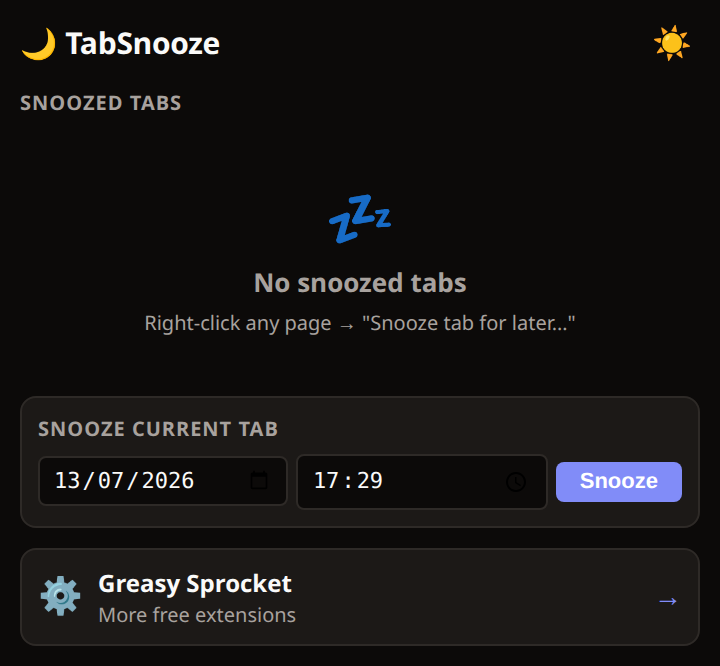
Right-click any tab → snooze it for later
Quick presets: 30 min, 1 hour, tonight (8pm), tomorrow (9am)
Custom time picker for any delay
Tab reopens automatically when the timer fires
Snooze list in popup — see what's coming, cancel anytime
Reopens in background tab (doesn't steal focus)
100% local — chrome.alarms API, no servers, no accounts
TabSnooze lets you postpone tabs for later. Right-click any tab, pick a time, and the tab closes. When the timer fires, it reopens automatically.
How it works
- Right-click any tab or page
- Pick a time — 30 min, 1 hour, tonight, tomorrow, or custom
- Tab closes — it’s saved in chrome.storage.local with an alarm
- Timer fires — tab reopens in a background tab
- Snooze list — popup shows all snoozed tabs, cancel anytime
Quick presets
| Preset | When it reopens |
|---|---|
| 30 min | 30 minutes from now |
| 1 hour | 1 hour from now |
| Tonight | Today at 8:00 PM |
| Tomorrow | Tomorrow at 9:00 AM |
| Custom | Any time you pick |
Privacy
TabSnooze doesn’t collect any data. No analytics, no tracking, no telemetry.
Snoozed tab URLs are stored in chrome.storage.local and never leave your browser.
The extension uses chrome.alarms for scheduling and chrome.tabs for reopening —
both are local Chrome APIs.
Free forever
TabSnooze is 100% free. All features are available to everyone. There are no premium tiers, no locked features, no usage limits. If you enjoy it, you can buy me a coffee — but there’s zero pressure.
How would you rate TabSnooze?
Click a star to vote — no account needed.
Frequently asked questions
Is TabSnooze really free?
Yes, 100% free. No premium tiers, no locked features. If you enjoy it, you can buy me a coffee — but there's zero pressure.
Does TabSnooze need an account or server?
No. TabSnooze uses Chrome's built-in chrome.alarms API. Everything is local — your snoozed tabs are stored in chrome.storage.local. No server, no account, no cloud sync.
What happens if I close Chrome?
Your snoozed tabs are saved. When you reopen Chrome, the alarms are still set. If a snooze time passes while Chrome is closed, the tab reopens next time you start Chrome.
Can I see what tabs I've snoozed?
Yes. Click the TabSnooze icon to see a list of all snoozed tabs with their remaining time. You can cancel any snooze from there.
Does TabSnooze track what I'm snoozing?
No. TabSnooze doesn't collect any data. No analytics, no tracking. Your snoozed tab URLs are stored locally and never sent anywhere.