ScrollFlow
Smooth scrolling, custom scrollbars, and scroll tools. 10 themes, zero config, works everywhere.
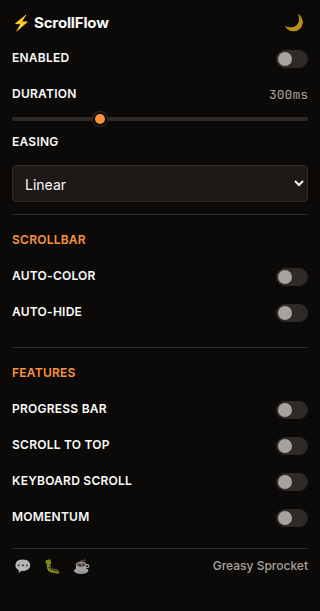
Smooth scroll with lerp interpolation — configurable duration and easing
10 scrollbar themes (minimal, round, neon, glass, wood, carbon, gold, sakura, ocean, ember)
Auto-color scrollbar — detects the site's accent color and tints to match
Scroll progress bar at the top of every page
Scroll-to-top floating button after 400px
Vim-style keyboard scroll: j/k, d/u, Space, gg, G
Momentum scroll with physics-based inertia
Auto-hide scrollbar — visible only while scrolling
FPS auto-degrade — drops to native scroll if FPS drops below 30
100% free, no premium tiers, no ads, no tracking
ScrollFlow enhances scrolling on every website with smooth interpolation, custom scrollbars, and practical scroll tools — all in one extension.
Features
| Feature | Default | What it does |
|---|---|---|
| Smooth scroll | ON | Lerp-based smooth scrolling with configurable duration + easing |
| Auto-color scrollbar | ON | Detects the site’s accent color and tints the scrollbar to match |
| Scrollbar themes | minimal | 10 built-in themes (minimal, round, neon, glass, wood, carbon, gold, sakura, ocean, ember) |
| Auto-hide scrollbar | OFF | Scrollbar invisible until you scroll, fades in/out |
| Progress bar | ON | Thin bar at top showing scroll progress, auto-colored to match site |
| Scroll-to-top | ON | Floating button appears after scrolling 400px, smooth scroll back to top |
| Keyboard scroll | ON | Vim-style: j/k (step), d/u (half page), Space (full page), gg (top), G (bottom) |
| Momentum scroll | OFF | Physics-based inertia — scroll keeps going and decelerates naturally |
| FPS auto-degrade | auto | Drops to native scroll if FPS < 30, re-enables when recovered |
Scrollbar themes
10 themes, all free:
| Theme | Vibe |
|---|---|
| Minimal | Thin, dark/light adaptive |
| Round | Rounded thumb, accent-colored |
| Neon | Glowing cyberpunk aesthetic |
| Glass | Frosted translucent |
| Wood | Warm, organic |
| Carbon | Dark weave texture |
| Gold | Luxurious metallic |
| Sakura | Soft pink cherry blossom |
| Ocean | Deep blue gradients |
| Ember | Fiery warm tones |
How it works
ScrollFlow injects a content script that intercepts wheel events and interpolates scroll position with lerp (linear interpolation) at 60fps via requestAnimationFrame. The easing curve is configurable (linear, ease-out, smooth, bounce).
The scrollbar customization works by injecting CSS ::-webkit-scrollbar rules into
the page. The auto-color feature detects the site’s accent color by scanning link
and button elements, then tints the scrollbar to match — subtle, not jarring.
A performance guard monitors framerate. If FPS drops below 30 (heavy pages, large documents), ScrollFlow automatically falls back to native scroll. When framerate recovers, smooth scroll re-engages.
Privacy
ScrollFlow doesn’t collect any data. No analytics, no tracking, no telemetry.
All preferences are stored locally via chrome.storage.sync. The extension
only requests storage permission — no host permissions, no tabs, no browsing
history access.
Free forever
ScrollFlow is 100% free. All 10 themes and every feature are available to everyone. There are no premium tiers, no locked features, no usage limits. If you enjoy it, you can buy me a coffee — but there’s zero pressure.
How would you rate ScrollFlow?
Click a star to vote — no account needed.
Frequently asked questions
Is ScrollFlow really free?
Yes, 100% free. All 10 scrollbar themes and every feature are available to everyone. No premium tiers, no locked features, no usage limits. If you enjoy it, you can buy me a coffee — but there's zero pressure.
Does ScrollFlow collect any data?
No. ScrollFlow doesn't collect any data. No analytics, no tracking, no telemetry. All preferences are stored locally in your browser via chrome.storage. Nothing leaves your device.
Will ScrollFlow slow down my browser?
No. ScrollFlow uses requestAnimationFrame for smooth scrolling and automatically falls back to native scroll if your framerate drops below 30fps. The performance guard re-enables smooth scroll when your framerate recovers.
Does ScrollFlow work on every website?
ScrollFlow works on most websites. Some sites with their own custom scroll handling (Google Docs, Figma) may not be affected. The extension detects sites with CSS scroll-behavior: smooth and doesn't interfere.
How do I change the scrollbar theme or scroll settings?
Click the ScrollFlow icon in your Chrome toolbar to open the popup. From there you can toggle features on/off, pick a scrollbar theme, adjust scroll duration, and choose an easing curve.
Can I use vim-style keyboard scrolling?
Yes. ScrollFlow supports vim-style keys: j/k for step scroll, d/u for half-page, Space for full-page, gg for top, G for bottom. This feature is enabled by default and can be toggled from the popup.