ReadTime AI
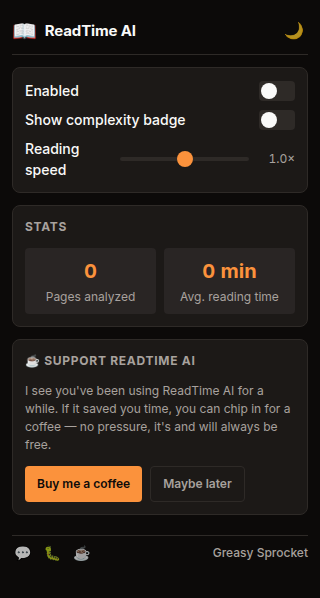
Realistic reading time on any article. Flesch-Kincaid + syllable density + technical terms. No naive word-count.
Flesch-Kincaid reading ease score — not just word count
Adjusted WPM based on text complexity (140-250 WPM range)
Technical term detection — adds time for jargon-heavy content
Difficulty indicator: 🟢 easy, 🟡 medium, 🔴 hard
Subtle badge in the corner — non-intrusive, dismissible
Only shows on article pages with 200+ words — no clutter on dashboards
Stats: pages analyzed, average reading time
100% offline, no ML, no servers, no tracking
ReadTime AI shows a realistic reading time estimate on any article. Instead of the naive “words ÷ 200” formula, it analyzes text complexity using proven readability heuristics and adjusts the reading speed accordingly.
How it works
- Extract article text — finds the main content container (article, main, [role=main], or largest text block on the page)
- Count — words, sentences, syllables
- Compute Flesch Reading Ease —
206.835 - 1.015 × (words/sentences) - 84.6 × (syllables/words) - Map to reading speed — easier text = faster reading:
| Reading Ease | Difficulty | WPM |
|---|---|---|
| 90-100 | Very easy | 250 |
| 70-90 | Easy | 220 |
| 50-70 | Medium | 200 |
| 30-50 | Difficult | 170 |
| 0-30 | Very difficult | 140 |
- Add technical term penalty — words ≥8 characters not in a common vocabulary list add 15% more time
- Show badge — ”📖 4 min read” with difficulty dot (🟢🟡🔴)
The badge
A small dark card appears in the bottom-right corner of article pages:
┌──────────────────────┐
│ 📖 4 min read  🟡  ✕ │
└──────────────────────┘- 📖 — reading time estimate
- 🟡 — difficulty indicator (green/yellow/red)
- ✕ — dismiss the badge for this page
The badge only appears on pages with 200+ words of article content. Short pages, dashboards, and login forms won’t trigger it.
Privacy
ReadTime AI doesn’t collect any data. No analytics, no tracking, no telemetry.
Your stats live in chrome.storage.local — they never leave your browser.
The only permission is storage (to save your settings and stats).
Free forever
ReadTime AI is 100% free. All features are available to everyone. There are no premium tiers, no locked features, no usage limits. If you enjoy it, you can buy me a coffee — but there’s zero pressure.
How would you rate ReadTime AI?
Click a star to vote — no account needed.
Frequently asked questions
Is ReadTime AI really free?
Yes, 100% free. All features are available to everyone. No premium tiers, no locked features, no usage limits. If you enjoy it, you can buy me a coffee — but there's zero pressure.
How is this different from other reading time extensions?
Most extensions use a naive 'words / 200 WPM' formula. ReadTime AI computes the Flesch-Kincaid reading ease score (based on syllable count, sentence length, and word complexity) and adjusts the reading speed accordingly. A dense technical article might be 140 WPM; an easy blog post might be 250 WPM. The estimate is much more accurate.
Does ReadTime AI use AI or ML?
No, despite the name. ReadTime AI uses proven readability heuristics — Flesch-Kincaid, syllable counting, technical term detection. All pure TypeScript computation, no models, no ML, no LiteRT. The 'AI' in the name is a playful nod, similar to TypeRacer AI.
How does the difficulty indicator work?
Based on the Flesch Reading Ease score: 🟢 (70-100, easy) = 220-250 WPM, 🟡 (50-70, medium) = 200 WPM, 🔴 (0-50, difficult) = 140-170 WPM. Technical terms (words ≥8 characters not in a common vocabulary list) add 15% more time.
Will ReadTime AI show a badge on every page?
No. ReadTime AI only shows the badge on pages with 200+ words of article content. It detects the main content container (article tag, main tag, [role=main], or largest text block). Dashboards, login pages, and short pages won't trigger the badge.
Does ReadTime AI track my reading?
No. ReadTime AI doesn't collect any data. No analytics, no tracking, no telemetry. Your stats (pages analyzed, average reading time) are stored locally in your browser via chrome.storage.local. Nothing leaves your device.