ReadAloud Lite
Select text → right-click → "Read aloud." Uses your browser's built-in voice. No servers, no premium voices, just what Chrome gives you.
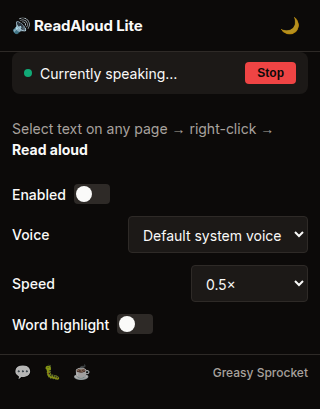
Select text → right-click → 'Read aloud'
Uses Web Speech API — your browser's built-in voices
Speed control — 0.5x to 2x playback speed
Voice picker — choose from installed system voices
Play/pause/stop controls in a floating mini-player
Highlights words as they're spoken
100% local — no servers, no cloud, no API keys
ReadAloud Lite reads selected text aloud using your browser’s built-in voices. Right-click any text → “Read aloud.” No cloud, no API keys, no premium tiers.
How it works
- Select text on any web page
- Right-click → “Read aloud”
- Mini-player appears — play, pause, stop, speed control
- Words highlight as they’re spoken
- Voice picker — choose from your system’s installed voices
Privacy
ReadAloud Lite doesn’t collect any data. No analytics, no tracking, no telemetry. The extension uses the Web Speech API, which runs entirely in your browser. Your selected text is processed locally and never sent to any server.
Free forever
ReadAloud Lite is 100% free. All features are available to everyone. There are no premium tiers, no locked voices, no usage limits. If you enjoy it, you can buy me a coffee — but there’s zero pressure.
How would you rate ReadAloud Lite?
Click a star to vote — no account needed.
Frequently asked questions
Is ReadAloud Lite really free?
Yes, 100% free. No premium tiers, no locked voices. All system voices are available to everyone.
How is this different from other TTS extensions?
Most TTS extensions use cloud APIs (Google, Amazon, Azure) that require API keys and send your text to servers. ReadAloud Lite uses only the Web Speech API — your browser's built-in voices. Your text never leaves your device.
What voices are available?
ReadAloud Lite uses whatever voices your operating system has installed. On Chrome, this includes Google's voices (added automatically) and any system voices. You can pick from the voice dropdown in the popup.
Can I adjust the reading speed?
Yes. Speed control from 0.5x to 2x. The speed persists across sessions.
Does ReadAloud Lite work offline?
Yes. The Web Speech API works offline with system-installed voices. Some Chrome voices require an internet connection for the first use, but system voices work fully offline.