PageSniff
Detects page type automatically — article, shop, docs, social, video, form. Shows a badge. Fuses with ScrollFlow.
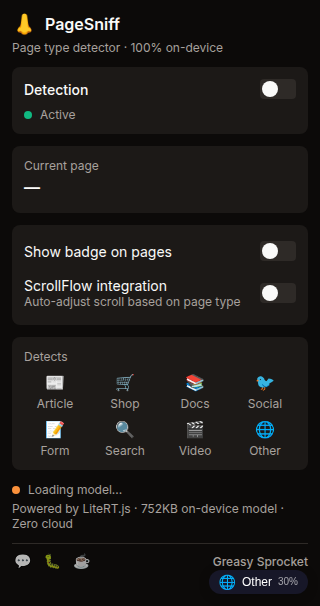
Detects 8 page types: article, shop, documentation, social, video, forum, form, landing
On-device ML classifier (LiteRT.js) — reuses ToxiFilter's text classification pipeline
URL heuristic pre-filter for instant detection on known domains
Subtle badge in the corner — non-intrusive, auto-colored per type
Fuses with ScrollFlow via chrome.storage.local — auto-adjusts scroll behavior per page type
Confidence score shown on hover — see how sure the classifier is
100% free, no premium, no ads, no tracking
PageSniff detects the type of page you’re viewing and shows a subtle badge. Article? Shop? Documentation? Social media? It knows — and it can tell other extensions too.
How it works
PageSniff uses a two-stage detection pipeline:
-
URL heuristics — Instant pattern matching on the URL. Known domains (youtube.com → video, github.com → docs/social, amazon.com → shop) are classified in microseconds, no ML needed.
-
ML text classifier — For unknown domains, an AverageWordVec text classifier (752KB, same LiteRT.js pipeline as ToxiFilter) analyzes the page’s text content. It looks at headings, paragraphs, and structural elements to determine the page type.
The result is a confidence score (0-100%) and a badge in the corner of your screen:
| Badge | Page Type | Example |
|---|---|---|
| 📄 | Article | Blog posts, news articles |
| 🛒 | Shop | Amazon, product pages |
| 📚 | Documentation | MDN, Stripe docs |
| 💬 | Social | Twitter, Reddit, HN |
| 🎬 | Video | YouTube, Vimeo |
| 🗨️ | Forum | Discussion boards |
| 📝 | Form | Login, signup pages |
| 🏠 | Landing | Marketing homepages |
Fusion with ScrollFlow
PageSniff writes the detected page type to chrome.storage.local. If you have
ScrollFlow installed, it can read this and auto-adjust:
- Documentation → Disable smooth scroll (precise navigation matters)
- Article → Enable progress bar + scroll-to-top
- Shop → Disable auto-color scrollbar (don’t interfere with product layouts)
- Video → Disable all scroll modifications (page is mostly static)
This is opt-in fusion — both extensions must be installed, and ScrollFlow’s
fusion setting must be enabled. No direct coupling, no message passing, just
shared state via chrome.storage.local.
Privacy
PageSniff runs entirely on-device. The ML model is bundled with the extension (752KB, shared pipeline with ToxiFilter). No page content, URLs, or browsing history is ever sent to any server. No analytics, no tracking, no telemetry.
Free forever
PageSniff is 100% free. All 8 page types and the ScrollFlow fusion are available to everyone. There are no premium tiers, no locked features, no usage limits. If you enjoy it, you can buy me a coffee — but there’s zero pressure.
How would you rate PageSniff?
Click a star to vote — no account needed.
Frequently asked questions
Is PageSniff really free?
Yes, 100% free. All 8 page type detections and the ScrollFlow fusion are available to everyone. No premium tiers, no locked features, no usage limits. If you enjoy it, you can buy me a coffee — but there's zero pressure.
Does PageSniff send my browsing data to a server?
No. PageSniff runs entirely on-device. The ML model is bundled with the extension and inference happens in your browser via LiteRT.js (WebGPU/WASM). No page content, URLs, or browsing history is ever sent to any server.
How does page detection work?
PageSniff uses a two-stage approach: URL heuristics first (instant for known domains like youtube.com, github.com, amazon.com), then an on-device ML text classifier that analyzes the page's text content for a confident classification. The result is fused into a simple badge.
What does 'fusion with ScrollFlow' mean?
PageSniff writes the detected page type to chrome.storage.local. ScrollFlow can read this and auto-adjust its behavior — for example, disabling smooth scroll on documentation sites, or enabling the progress bar on long articles. This is opt-in and requires both extensions installed.
What are the 8 page types?
Article (blog posts, news), Shop (e-commerce), Documentation (MDN, docs sites), Social (Twitter, Reddit, HN), Video (YouTube, Vimeo), Forum (discussion boards), Form (login, signup pages), and Landing (marketing/homepages).
Will PageSniff slow down my browser?
No. The URL heuristic runs instantly. The ML classifier runs once per page load (not on every scroll or interaction) and takes milliseconds. The model is tiny (752KB, shared with ToxiFilter's pipeline).