GateKeeper
Mindful intervention before you waste time. A 5-second pause on distracting sites — friction, not force.
5-second countdown overlay on distracting sites — mindful friction, not a hard block
12 default blocked sites: Reddit, Twitter/X, YouTube, Instagram, TikTok, Facebook, Netflix, Twitch, 9gag, Imgur, Pinterest, and more
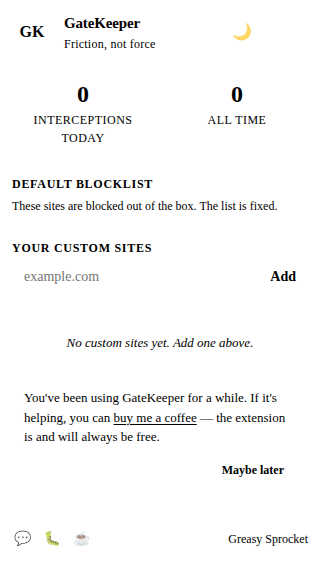
Add custom sites to block — any domain you want to add friction to
Toggle the extension on/off instantly from the popup
Interception stats — see how many times you've been stopped
'Take me back' (default) or 'I'm sure' — your choice after the countdown
100% offline, no servers, no ML, no tracking
GateKeeper adds mindful friction to distracting websites. Instead of hard-blocking, it shows a 5-second countdown overlay asking “Is this what you meant to do?” — giving you a moment to reconsider before falling into a rabbit hole.
How it works
- You navigate to a distracting site (e.g., reddit.com)
- GateKeeper detects the URL matches a blocked site
- Overlay appears — dark screen with “Wait…” and a 5-second countdown
- Countdown finishes — two buttons appear:
- “Take me back” (primary, highlighted) — goes back in history
- “I’m sure, let me in” (outline, less prominent) — proceeds to the site
- Your choice is logged — interception count increases either way
The 5-second delay is the key. It’s long enough to break the automatic reflex of opening Reddit when you’re bored, but short enough to not feel oppressive.
Default blocked sites
12 sites, all customizable:
| Site | Domain |
|---|---|
| reddit.com | |
| Twitter / X | twitter.com, x.com |
| YouTube | youtube.com |
| instagram.com | |
| TikTok | tiktok.com |
| facebook.com | |
| Netflix | netflix.com |
| Twitch | twitch.tv |
| 9gag | 9gag.com |
| Imgur | imgur.com |
| pinterest.com |
Add or remove sites from the popup. Any domain works — news sites, forums, whatever you want to add friction to.
Privacy
GateKeeper doesn’t collect any data. No analytics, no tracking, no telemetry.
Your settings and interception count live in chrome.storage.local — they never
leave your browser. The only permission is storage (to save your settings and stats).
Free forever
GateKeeper is 100% free. All features are available to everyone. There are no premium tiers, no locked features, no usage limits. If you enjoy it, you can buy me a coffee — but there’s zero pressure.
How would you rate GateKeeper?
Click a star to vote — no account needed.
Frequently asked questions
Is GateKeeper really free?
Yes, 100% free. All features are available to everyone. No premium tiers, no locked features, no usage limits. If you enjoy it, you can buy me a coffee — but there's zero pressure.
How is GateKeeper different from other site blockers?
GateKeeper doesn't hard-block sites. It adds a 5-second countdown overlay with a mindful question: 'Is this what you meant to do?' After the countdown, you can choose 'Take me back' (the default, highlighted) or 'I'm sure, let me in'. The idea is friction, not force. You always have the choice to proceed.
Which sites are blocked by default?
12 sites: reddit.com, twitter.com, x.com, youtube.com, instagram.com, tiktok.com, facebook.com, netflix.com, twitch.tv, 9gag.com, imgur.com, pinterest.com. You can add or remove sites from the popup.
Can I add my own sites to block?
Yes. Open the GateKeeper popup, type a domain in the 'Add custom site' field, and press Enter. The site will be added to your blocked list. You can remove it anytime by clicking the X next to it.
Does GateKeeper track my browsing?
No. GateKeeper doesn't collect any data. No analytics, no tracking, no telemetry. Your settings and interception count are stored locally in your browser via chrome.storage.local. Nothing leaves your device.
What happens when I disable GateKeeper?
When disabled, GateKeeper won't show the overlay on any site. The content script still loads but checks the enabled flag and does nothing if it's off. You can toggle it back on from the popup at any time.