FormBuddy
Autosaves everything you type in forms. If the page crashes or reloads, restore with one click.
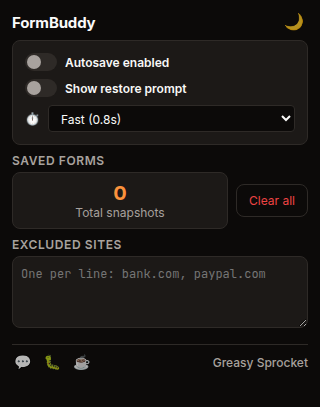
Automatically saves form fields as you type — inputs, textareas, selects
Restore banner appears when saved data is detected on the page
One-click restore fills all fields back in, even on React/Vue sites
Configurable autosave delay (instant, fast, careful, relaxed)
Excludes banking, PayPal, and Google accounts by default — add your own
Max 10 snapshots per site with automatic oldest-first cleanup
MutationObserver catches forms added dynamically after page load
100% free, no premium tiers, no ads, no tracking
FormBuddy automatically saves everything you type in web forms. If the page crashes, reloads, or you accidentally close the tab, FormBuddy remembers your input and offers to restore it with a single click when you return.
How it works
When you type in any form field on any website, FormBuddy silently saves your input to local storage. It uses a debounced save — by default, it waits 800ms after you stop typing before writing, so there’s no performance impact.
If you later return to a page where FormBuddy has saved data (e.g. after a crash, reload, or navigating away), a small banner appears in the bottom-right corner:
📋 FormBuddy found your saved form — last saved 2m ago on “Contact Us” [Restore] [Dismiss]
Click Restore and all your fields are filled back in instantly. The restore
uses native value setters and dispatches input/change events, so it works
correctly even on sites built with React, Vue, Svelte, or other modern frameworks.
What it saves
| Field type | Saved? | Notes |
|---|---|---|
| Text, email, URL, tel, search | ✅ | All text inputs |
| Number | ✅ | Numeric inputs |
| Password | ✅ | Skipped if autocomplete=off (banking) |
| Textarea | ✅ | Large text fields, comment boxes |
| Select dropdowns | ✅ | Selected option value |
| Hidden, submit, button, file | ❌ | Not text content |
| Checkbox, radio, range, color | ❌ | Not text content |
| Date, time, datetime | ❌ | Not text content |
Settings
| Setting | Default | What it does |
|---|---|---|
| Autosave enabled | ON | Master toggle for the entire extension |
| Show restore prompt | ON | Display the restore banner when saved data is found |
| Autosave delay | Fast (0.8s) | How long to wait after you stop typing before saving |
| Excluded sites | Banking + PayPal + Google | Sites where FormBuddy will not save or restore anything |
Excluded sites
FormBuddy excludes the following sites by default to protect sensitive data:
accounts.google.compaypal.combanking.(matches any domain containing “banking.”)secure.(matches any domain containing “secure.”)login.microsoftonline.com
You can add or remove sites from this list in the popup. Matching is flexible — it checks exact domain, subdomain suffix, and substring inclusion.
Privacy
FormBuddy doesn’t collect any data. No analytics, no tracking, no telemetry.
All form snapshots are stored locally via chrome.storage.local — nothing ever
leaves your device. The extension only requests storage and local permissions.
No host permissions, no tabs, no browsing history access.
Form snapshots are keyed by page origin and form signature (a hash of field names). They are never transmitted to any server. You can clear all snapshots at any time from the popup with the “Clear all” button.
Free forever
FormBuddy is 100% free. All features are available to everyone. There are no premium tiers, no locked features, no usage limits. If you enjoy it, you can buy me a coffee — but there’s zero pressure.
How would you rate FormBuddy?
Click a star to vote — no account needed.
Frequently asked questions
Is FormBuddy really free?
Yes, 100% free. All features are available to everyone. No premium tiers, no locked features, no usage limits. If you enjoy it, you can buy me a coffee — but there's zero pressure.
Does FormBuddy collect any data?
No. FormBuddy doesn't collect any data. No analytics, no tracking, no telemetry. All form snapshots are stored locally in your browser via chrome.storage.local. Nothing ever leaves your device or is sent to any server.
How does FormBuddy restore my form data?
When you visit a page where FormBuddy previously saved form data, a small banner appears in the bottom-right corner showing when the data was last saved. Click Restore and all your fields are filled back in. The restore uses native value setters and dispatches input/change events, so it works even on sites built with React, Vue, or other frameworks.
Does FormBuddy save passwords?
FormBuddy saves password fields by default so you can recover them after a crash. However, it skips password fields that have autocomplete=off (common on banking and security sites). You can also add any site to the excluded list to prevent FormBuddy from saving anything on that domain.
Can I exclude specific websites?
Yes. FormBuddy excludes banking sites, PayPal, and Google accounts by default. You can add or remove sites from the excluded list in the popup — just enter one domain per line. FormBuddy will not save or restore anything on excluded sites.
What happens if I have multiple forms on the same site?
FormBuddy creates a unique signature for each form based on its field names. If you fill out different forms on the same site, each one is saved and restored independently. Up to 10 snapshots per site are kept, with the oldest automatically deleted when the limit is reached.
Will FormBuddy slow down my browser?
No. FormBuddy uses a debounced save (800ms by default) so it only writes to storage after you stop typing. The content script is lightweight and runs at document_idle. CPU and storage usage are negligible.