FontBuddy
Resize and swap fonts on any site. Ctrl+Shift+↑/↓ to change size. Dyslexia-friendly font option. Changes are subtle, never break layouts.
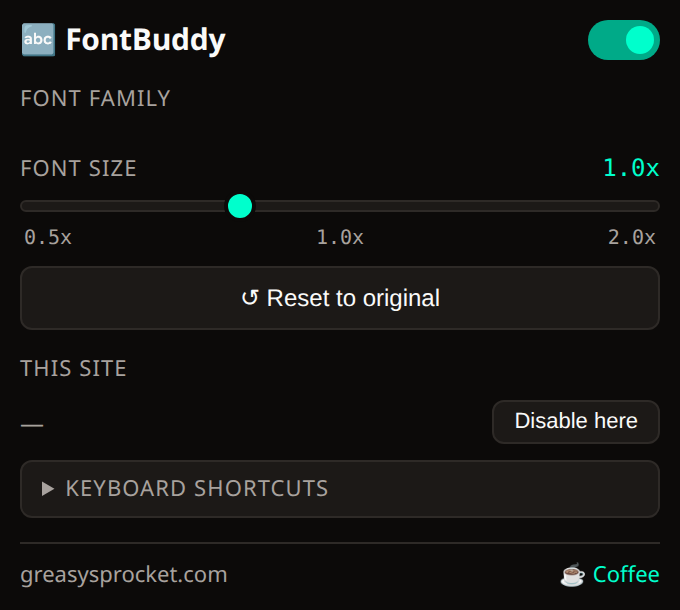
Ctrl+Shift+↑/↓ to increase/decrease font size
Ctrl+Shift+F to cycle font families — serif, sans-serif, OpenDyslexic
Dyslexia-friendly font — OpenDyslexic for easier reading
Per-site settings — different size/font per website
Reset to original with Ctrl+Shift+0
Popup with sliders for fine-grained control
Subtle CSS changes — never breaks page layouts
100% local — no servers, no tracking
FontBuddy lets you adjust font size and family on any website with keyboard shortcuts. Ctrl+Shift+↑/↓ for size, Ctrl+Shift+F to cycle fonts. Includes OpenDyslexic for easier reading.
Keyboard shortcuts
| Shortcut | Action |
|---|---|
| Ctrl+Shift+↑ | Increase font size |
| Ctrl+Shift+↓ | Decrease font size |
| Ctrl+Shift+F | Cycle font family |
| Ctrl+Shift+0 | Reset to original |
Font families
| Family | Description |
|---|---|
| Default | Site’s original font |
| Sans-serif | Clean sans-serif (system font) |
| Serif | Readable serif (Georgia) |
| OpenDyslexic | Dyslexia-friendly font |
Privacy
FontBuddy doesn’t collect any data. No analytics, no tracking, no telemetry.
Your per-site settings are stored in chrome.storage.local. The OpenDyslexic
font is bundled with the extension — no external downloads.
Free forever
FontBuddy is 100% free. All features are available to everyone. There are no premium tiers, no locked features, no usage limits. If you enjoy it, you can buy me a coffee — but there’s zero pressure.
How would you rate FontBuddy?
Click a star to vote — no account needed.
Frequently asked questions
Is FontBuddy really free?
Yes, 100% free. No premium tiers, no locked features. The OpenDyslexic font is also free and included.
Will FontBuddy break website layouts?
FontBuddy only changes font-size and font-family on the body element — it uses relative scaling so layouts flex naturally. On rare occasions, pixel-perfect sites may shift slightly. You can disable FontBuddy per-site.
What is OpenDyslexic?
OpenDyslexic is a free font designed to help with dyslexia. Letters have heavier bottoms, wider spacing, and unique shapes to reduce confusion between similar characters. It's bundled with FontBuddy — no download needed.
Does FontBuddy sync my settings?
No. Settings are stored per-site in chrome.storage.local. No cloud, no sync, no accounts.
Do the keyboard shortcuts conflict with other extensions?
FontBuddy uses Ctrl+Shift+↑/↓/F/0. If these conflict with another extension, you can disable shortcuts from the popup.