EmojiBar
Type : in any text field to get an emoji picker like Slack/Discord. 600+ emojis, zero config, works everywhere.
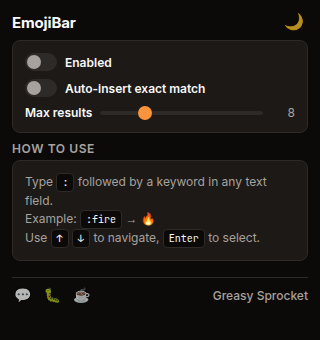
Type : in any text field to trigger an emoji picker — works on every website
600+ emojis with fuzzy search by shortcode (:fire) and keyword (flame, hot, burn)
Keyboard navigation: ↑↓ to browse, Enter/Tab to select, Escape to dismiss
Auto-insert mode: instantly replaces :shortcode when there's an exact match
Works in textareas, input fields, and contenteditable editors (Gmail, Notion, Slack web)
Adjustable max results (4–20) and dark/light popup theme
100% free, no premium tiers, no ads, no tracking
EmojiBar adds a Slack-style emoji picker to every website. Type : in any text field,
search by keyword, and insert — no copy-pasting, no emoji keyboard, no hassle.
How it works
When you type : followed by a keyword in any text field, EmojiBar detects the
pattern and shows a dropdown picker with matching emojis. The search ranks results
by relevance: exact shortcode matches first, then prefix matches, then keyword matches.
For example:
| You type | You get |
|---|---|
:fire | 🔥 |
:heart | ❤️ |
:rofl | 🤣 |
:thumbs | 👍 |
:coffee | ☕ |
:rocket | 🚀 |
Use ↑↓ to navigate results, Enter or Tab to insert, and Escape to dismiss. You can also click an emoji directly with your mouse.
Features
| Feature | Default | What it does |
|---|---|---|
| Emoji picker | ON | Type : in any text field to trigger a dropdown with matching emojis |
| Fuzzy search | ON | Matches by shortcode (:fire) and keyword (flame, hot, burn) |
| Keyboard navigation | ON | ↑↓ to browse, Enter/Tab to select, Escape to dismiss |
| Auto-insert | OFF | Instantly replaces :shortcode when there’s an exact match — no Enter needed |
| Max results | 8 | Adjustable from 4 to 20 results in the dropdown |
| Popup theme | dark | Toggle between dark and light in the popup settings |
Where it works
EmojiBar works in any standard text input across the web:
- Textareas — comment boxes, chat inputs, forum posts
- Input fields — search bars, title fields, form inputs
- Contenteditable editors — Gmail compose, Notion, Slack web, Discord web, Google Docs comments
The content script auto-injects on all pages at document_idle, so there’s no
configuration needed. Just install and start typing :.
Search ranking
Results are ranked by relevance:
- Exact shortcode match (
:heart→ ❤️) — highest priority - Shortcode prefix match (
:he→ ❤️, 🧡, 💛) - Keyword exact match (
:laugh→ 😂, 🤣, 😆) - Shortcode contains (
:art→ 🎨, 🎭) - Keyword substring (
:fla→ 🔥 via “flame” keyword)
Privacy
EmojiBar doesn’t collect any data. No analytics, no tracking, no telemetry.
All preferences are stored locally via chrome.storage.sync. The extension
only requests storage permission — no host permissions, no tabs, no browsing
history access. The emoji dataset is bundled with the extension — nothing is
downloaded from external servers.
Free forever
EmojiBar is 100% free. All 600+ emojis and every feature are available to everyone. There are no premium tiers, no locked features, no usage limits. If you enjoy it, you can buy me a coffee — but there’s zero pressure.
How would you rate EmojiBar?
Click a star to vote — no account needed.
Frequently asked questions
Is EmojiBar really free?
Yes, 100% free. All 600+ emojis and every feature are available to everyone. No premium tiers, no locked features, no usage limits. If you enjoy it, you can buy me a coffee — but there's zero pressure.
Does EmojiBar collect any data?
No. EmojiBar doesn't collect any data. No analytics, no tracking, no telemetry. All preferences are stored locally in your browser via chrome.storage. Nothing leaves your device.
How do I use EmojiBar?
Just type : followed by a keyword in any text field on any website. For example, :fire shows matching emojis (🔥). Use ↑↓ to navigate, Enter or Tab to select, and Escape to dismiss the picker. You can also click an emoji with your mouse.
Does EmojiBar work on every website?
EmojiBar works on most websites. It supports standard textareas, input fields, and contenteditable editors (Gmail, Notion, Slack web, Discord web, and more). Some sites with heavily custom input handling may not trigger the picker.
What's the auto-insert feature?
When auto-insert is enabled, EmojiBar instantly replaces :shortcode with the matching emoji as soon as there's an exact match — no need to press Enter. For example, typing :heart auto-replaces to ❤️. It's off by default and can be toggled from the popup.
How many emojis does EmojiBar have?
600+ emojis covering faces, gestures, animals, food, activities, travel, objects, and symbols. Search works by shortcode (:rofl) and by keyword (laugh, lol, face). Results are ranked by relevance.