CopyCat
Clipboard history that lives in your browser. Everything you copy is searchable for 30 days. 100% local, no cloud.
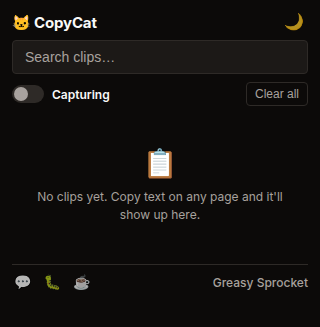
Auto-captures everything you copy (Ctrl+C) on any page
Searchable history — find any copied text by keyword
Last 100 items, auto-cleaned after 30 days
Click any item to copy it again instantly
Popup UI with search bar + recent items
Pin important clips so they don't expire
100% local — chrome.storage.local, no cloud, no sync
CopyCat keeps a searchable history of everything you copy. Ctrl+C on any page, and the text is saved. Search by keyword, click to copy again.
How it works
- Copy anything — select text, Ctrl+C, on any website
- CopyCat captures it — stores the text in chrome.storage.local
- Open popup — search by keyword, browse recent clips
- Click any item — it’s copied to your clipboard again
- Pin important clips — they won’t expire
Privacy
CopyCat doesn’t collect any data. No analytics, no tracking, no telemetry.
Your clipboard history is stored in chrome.storage.local and never leaves
your browser. No cloud, no sync, no accounts.
The extension skips password fields and clips shorter than 2 characters. You can toggle CopyCat off from the popup anytime.
Free forever
CopyCat is 100% free. All features are available to everyone. There are no premium tiers, no locked features, no usage limits. If you enjoy it, you can buy me a coffee — but there’s zero pressure.
How would you rate CopyCat?
Click a star to vote — no account needed.
Frequently asked questions
Is CopyCat really free?
Yes, 100% free. No premium tiers, no locked features. If you enjoy it, you can buy me a coffee — but there's zero pressure.
Does CopyCat send my clipboard to the cloud?
No. Everything stays in your browser via chrome.storage.local. No cloud, no sync, no accounts. Your clipboard history never leaves your device.
How much history does CopyCat keep?
The last 100 items you copied. Items auto-expire after 30 days unless you pin them. Pinned items stay forever.
Can CopyCat capture passwords?
CopyCat skips input fields with type=password. It also skips very short clips (under 2 characters). For sensitive content, you can toggle CopyCat off from the popup.
Does CopyCat work with images or files?
No. CopyCat only captures text copies. Image and file clipboard entries are ignored.