Carbon Copy
Automatic Cc and Bcc for Gmail, driven by rules you own.
How to install manually (2 minutes)
Option A — CRX (updates itself). Download the
signed CRX, open
chrome://extensions, turn on Developer mode and drag
the .crx onto the page. Chrome then checks
/updates/carbon-copy.xml and installs new versions on its own.
Chrome will warn that the extension is not in the Web Store and
leave it disabled: click Details, flip the switch and confirm
Keep. That is the normal warning for any self-hosted CRX; the ID shown
must match the one on this page.
Option B — ZIP (no updates). Download the ZIP above, unzip it, then Load unpacked and pick the folder. It stays local, but it will never update itself.
Either way the extension never phones home beyond checking for a new version.
Carbon Copy
Features
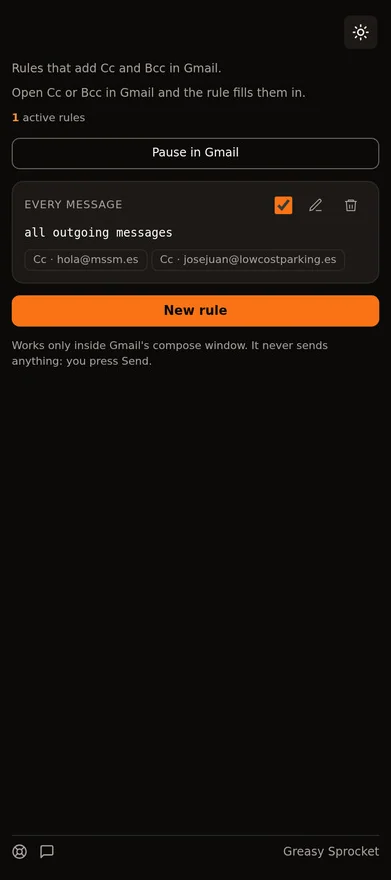
- Every outgoing message: an unconditional rule that always copies someone
- Rules that match the recipient's domain, an exact recipient, or subject keywords
- Adds Cc and/or Bcc addresses automatically while you write in Gmail
- Matching rules accumulate: every one applies, with no duplicates
- Only adds, never removes — what you type by hand is respected
- Deleted a chip the extension added? It stays deleted in that composer
- Never sends: it fills the composer, you press Send
- No account, no server, no telemetry — rules live in chrome.storage
- Open source, one single job done well
Write the rule once, and keep writing: matching messages get the right people in Cc and Bcc.
How would you rate Carbon Copy?
Click a star to vote — no account needed.
Frequently asked questions
Does Carbon Copy read my emails?
No. It reads the recipients and subject of the message you are currently writing in the Gmail composer, to match your rules. It never reads your inbox, never sends, and stores nothing outside your browser.
Where are my rules stored?
In Chrome's own storage, kept across your profiles by Chrome Sync. Nothing is uploaded to a server: there is no account and no backend.
Can I stop it without deleting my rules?
Yes. The Pause in Gmail switch stops the extension from touching the composer until you turn it back on.